


Your estimate is a promise. Your job costing is the receipt. Most contractors are great at the promise — they'll build a sharp bid, win the job, and run it hard. Then the job ends, the money's a little tighter than it should be, and nobody can say exactly where it went. That gap, between what you bid and what actually happened, is the single most expensive blind spot in construction, and job costing is the only thing that closes it. I'm a working construction CFO, and this is what a real job costing system actually does, in plain English.
If you want to see the gap on a job you have already run, the free job cost variance calculator does estimate versus actual in about two minutes.
What job costing actually is
Job costing is tracking every dollar a job actually costs, in the same categories you estimated it, so you can compare the two while you still have time to react. That's it — not accounting theater, just the discipline of putting actual costs next to estimated costs, job by job, line by line, so the job tells you how it's doing instead of surprising you at the end.
The buckets every system tracks
You can't compare estimate to actual if they don't speak the same language. Every job costing system worth using sorts costs into the same handful of buckets on both sides:
- Labor — your crew's hours and burdened wage (not just the hourly rate — include payroll taxes, comp, and benefits).
- Materials — everything you buy and install.
- Subcontractors — what you pay your subs, tracked per trade.
- Equipment & other — rentals, dumpsters, permits, and the miscellaneous costs that quietly add up.
Four buckets, two columns — estimated and actual. Get that structure right and the whole system works. Get it wrong, and you're comparing apples to a number you can't trust.
Estimate vs. actual is the only comparison that matters
Here's a real one. Say you land a kitchen remodel at $120,000, and you estimated $96,000 in costs — a clean 20% margin on paper. Here's how it actually closed out:
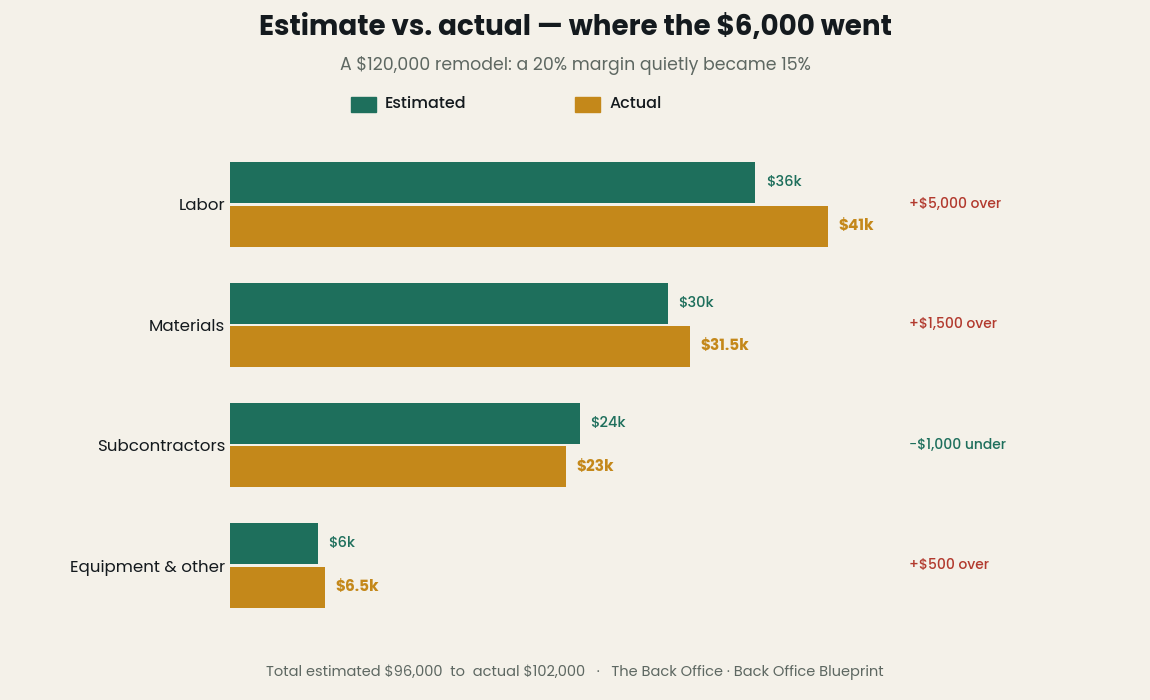
Labor ran $5,000 over. Materials crept up $1,500. Subs came in $1,000 under. Equipment and other ran $500 over. Add it up and your $96,000 job actually cost $102,000 — so your $24,000 profit became $18,000, and your 20% margin quietly became 15%. Without job costing, you feel that as "huh, tighter than I thought." With job costing, you see it in week three when labor starts running hot — while you can still adjust the crew, the schedule, or the scope. Same overrun, completely different outcome, because you saw it coming.
WIP is where job costing grows up
For a single short job, estimate-vs-actual is enough. The moment you're running several jobs across several months, you need the next layer: Work in Progress (WIP). WIP answers a question your bank account can't: are you over-billed or under-billed on each job right now?
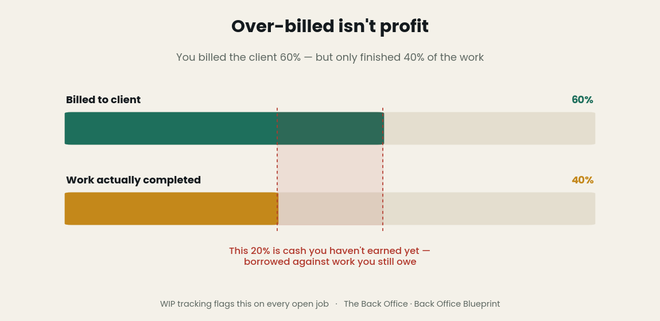 If you've billed a client 60% of the contract but only completed 40% of the work, that extra cash in your account isn't profit — it's borrowed against work you still owe. Plenty of contractors have "felt rich" mid-job and run out of money before the finish, because they were spending billings they hadn't earned yet. A real job costing system tracks percent complete, cost-to-complete, and over/under billing on every open job — the difference between a spreadsheet that records the past and a system that protects your future.
The numbers a real system gives you back
Set it up right and the system stops being data entry and starts answering questions:
- Gross margin by job — which jobs actually make money, not which ones feel busy.
- Cost-to-complete — what's left to spend before this job is done.
- Projected final cost and profit — where the job lands if today's trend holds.
- Variance by category — exactly which bucket is bleeding, so you fix the cause, not the symptom.
Those four numbers are how you stop guessing and start steering.
"I'll just check QuickBooks"
QuickBooks tells you the company made money. It's terrible at telling you which job made money, in the categories you bid, against the estimate you wrote — that's not what general accounting software is built for, and the job-costing add-ons are expensive and clunky for most small contractors. A purpose-built spreadsheet sits in the gap: structured exactly like your estimate, fast to update, and built to surface variance and WIP without an accounting degree. It's the layer between "we're busy" and "we're profitable."
Don't build this from scratch
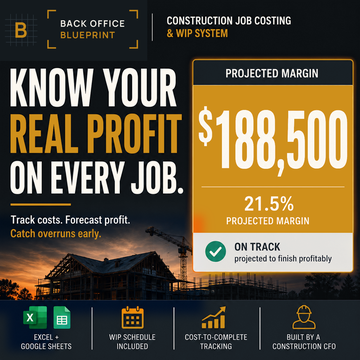
You can build a job costing system yourself. I did, over years, breaking it and rebuilding it until the estimate, the actuals, the WIP schedule, and the profit math all tied together cleanly. It's a lot of spreadsheet engineering for something every contractor needs and almost nobody has time to build. So I packaged mine. The Construction Job Costing Spreadsheet gives you the whole system — estimate-vs-actual by category, a WIP schedule, and profit tracking by job — in one workbook, built by a construction CFO for the way jobs actually run. Drop in your numbers and the job starts telling you the truth.
I'm a working construction CFO and the founder of Back Office Blueprint, where I build the estimating, job costing, and compliance systems I wished every builder and trade contractor had from day one.
Keep reading
Markup vs. margin in construction — and why the difference is quietly killing your bids — the number the job costing is measured against.
You’re not short on profit — you’re short on collections — a costed job that still hasn’t paid you.
Bidding and tracking are the same loop. The Estimating + Job Costing Bundle runs both ends of it.